


Having finished onboarding, you've had your initial exposure to the CASSA system via your personal profile and, depending on your role, perhaps your company profile, too.
Now, regardless of your role, at some point you're going to come back to your personal profile to complete the other aspects, as shown below:
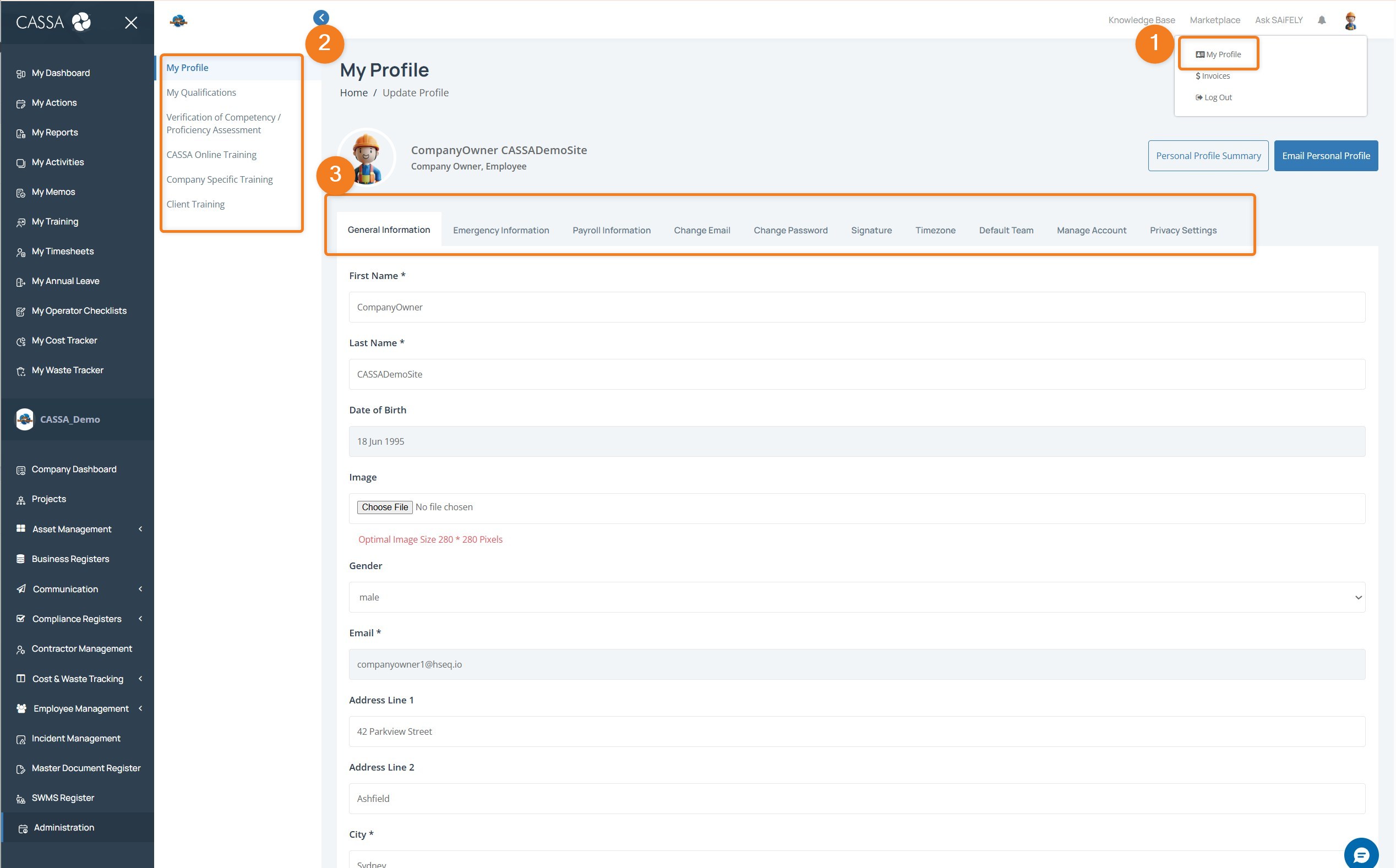
As you can see, we have the main My Profile tabs: General Information, Emergency Information, Payroll Information, Change Email, Change Password, Signature, Timezone, Default Team, Manage Account, and Privacy Settings.
We'll look at these in their respective articles, but this is where you access and can add, review, or edit that information.
Also, in the sub-menu (marked with the number 2), you can also see we have several other areas within My Profile:
My Qualifications
Verification of Competency / Proficiency Assessment
CASSA Online Training
Company Specific Training
Client Training
We'll cover these shortly, but we recommend flicking through and familiarising yourself. These sections will become more relevant to you as time progresses and you further develop your skills and competencies.