


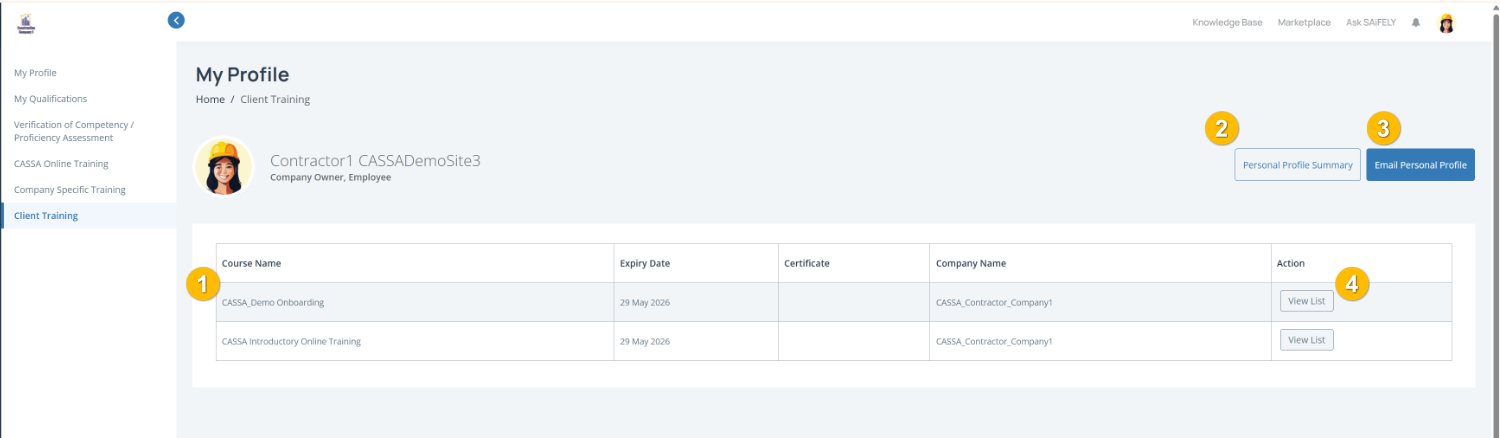
The Client Training tab (1) displays training courses assigned by clients you are working with. This may include onboarding, inductions or project-specific requirements that must be completed before accessing a site or starting work.
To complete this page:
Review assigned training by checking the training table (1). You can view the Course Name, Expiry Date, certificate availability and associated Company Name.
Open assigned training by clicking View List (4) in the Action column. This will display available training courses and assigned learning activities.
Access certificates by clicking View in the Certificate column for completed training where a certificate is available.
Note: Some client training may have an expiry date and require renewal to remain compliant with project or site requirements.
You can also:
View your Personal Profile Summary (2)
Email Personal Profile (3) to send a copy of your profile details by email.