

The My Qualifications page is where you can keep track of your licences, tickets and qualifications. You can add new qualifications, upload supporting documents and manage existing records.
To complete this page:
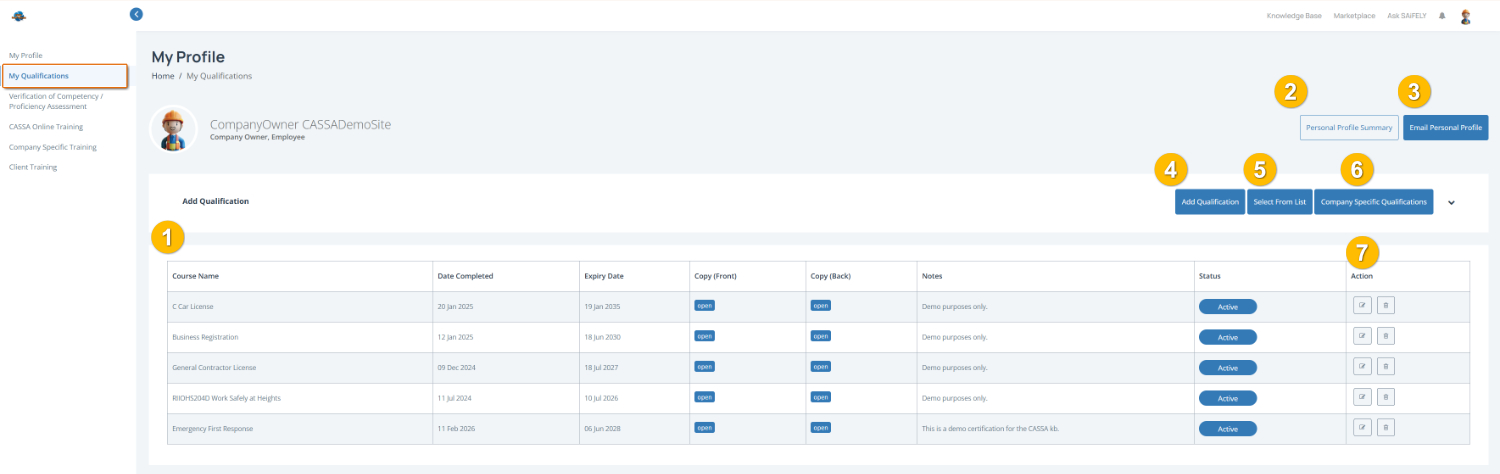
View your qualifications in the qualifications table (1), including:
Course Name – The qualification or licence name
Date Completed – When the qualification was completed
Expiry Date – When the qualification expires (if applicable)
Copy (Front) / Copy (Back) – Uploaded document images or files
Notes – Additional qualification details
Status – Whether the qualification is active
Add a qualification by clicking the Add Qualification button (4) and entering the required details.
Select a qualification from a list by clicking Select From List (5) to quickly add common qualifications.
View company-specific qualifications by selecting Company Specific Qualifications (6) to see qualifications required by your organisation.
Edit or delete a qualification using the action buttons (7) next to each qualification.
Note: Keep your qualifications up to date and upload copies where possible to help with compliance and verification.
You can also:
View your Personal Profile Summary (2)
Email Personal Profile (3) to send a copy of your profile details by email.