


The Projects dashboard allows you to view all projects available to your company, switch between project types, apply filters, and access individual project records. You can also add new projects where permitted.
To review and manage projects:
1. Open the Projects dashboard by selecting Projects from the main menu (1)
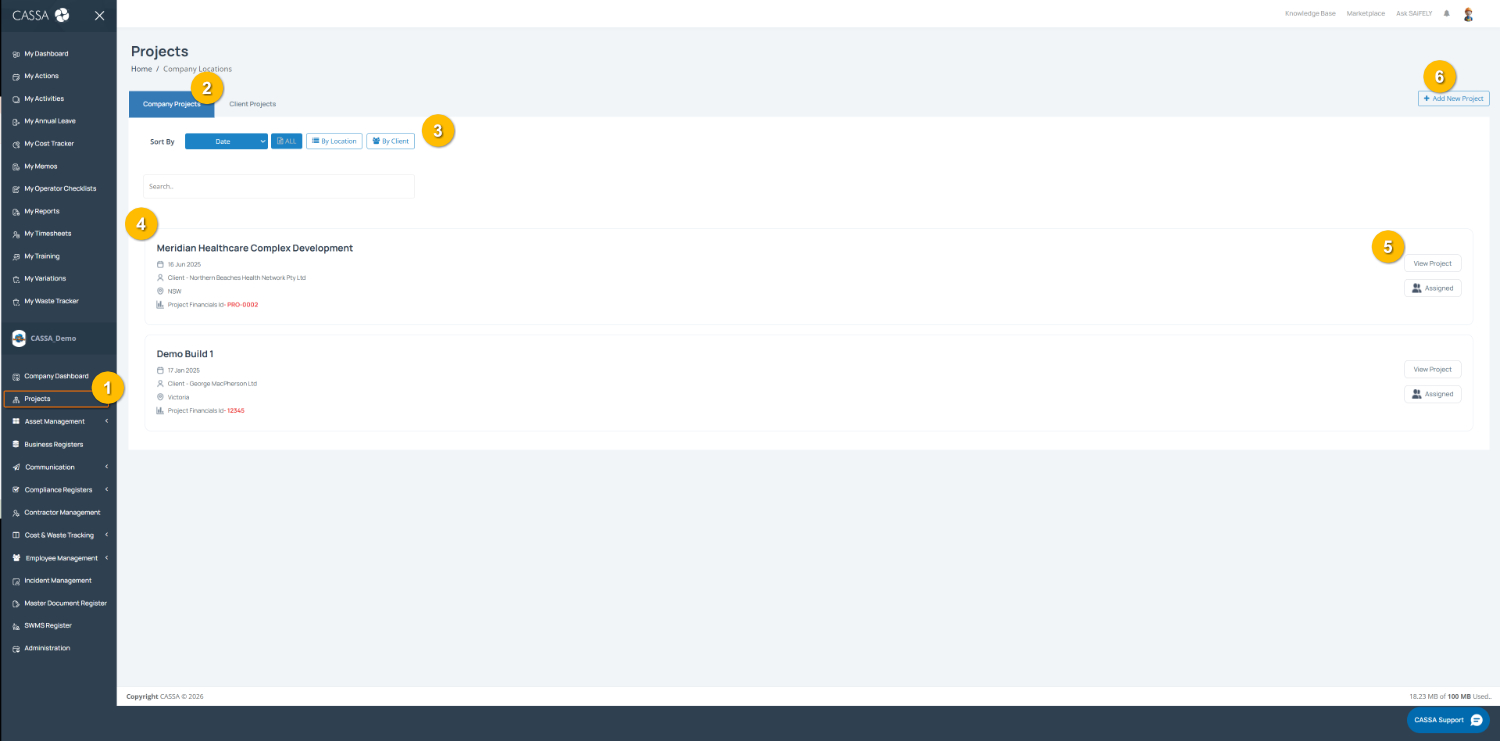
Switch between project types using the tabs at the top of the page (2):
Company Projects displays projects created and managed by your company.
Client Projects displays projects linked to clients.
Filter project results using the options at the top of the page (3). You can:
Sort projects using the Sort By dropdown.
Filter by All, Location, or Client to narrow results.
Use the search field to find a specific project.
Review project information from the project list (4). Each project card displays key details, including:
Project name
Project date
Client Location
Project financial reference (where applicable)
Open a project by selecting View Project (5). Depending on your permissions and assignment, you may also see an Assigned indicator showing your involvement in the project.
Add a new project by selecting Add New Project (6), where permitted.
You can also:
Switch between Company Projects and Client Projects to view different project types.
Search and filter projects to quickly locate active or historical records.