

The Dashboard is the home screen of the CASSA mobile app. It provides a summary of your activities, SWMS, and memos, along with quick access to the app menu, commonly used actions, and support.
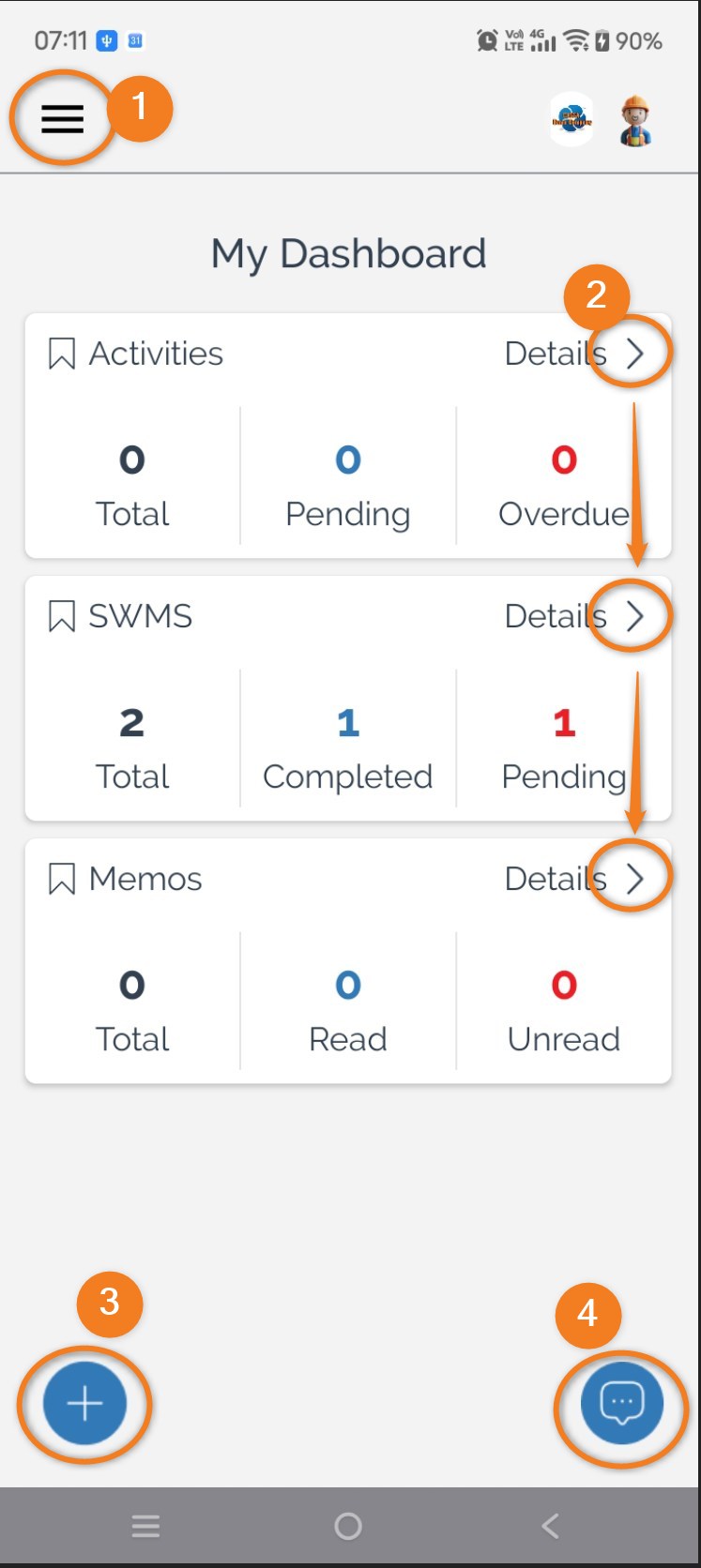
To navigate the app dashboard:
Open the main menu by selecting the Menu button (1). This provides access to all available modules and features within the app.
View detailed information by selecting Details (2) on any dashboard card. Each card displays a summary of your current items, and Details opens the corresponding list for:
Activities
SWMS
Memos
Create a new record by selecting the Add button (3). Depending on your permissions, you can create:
Timesheets
Operator Checklists
Purchase Orders
Cost Tracker entries
Waste Tracker entries
QR Code scans
Access help and support by selecting the Help button (4). This opens the in-app support options when assistance is required.
You can also:
Monitor outstanding work directly from the dashboard cards.
View item counts, such as pending activities, completed SWMS, and unread memos, at a glance.
Use the dashboard as the starting point for accessing the app's most frequently used features.