

The My Actions page displays actions that have been assigned to you through CASSA. You can view outstanding and completed actions, search for specific records, and close actions once the required work has been completed.
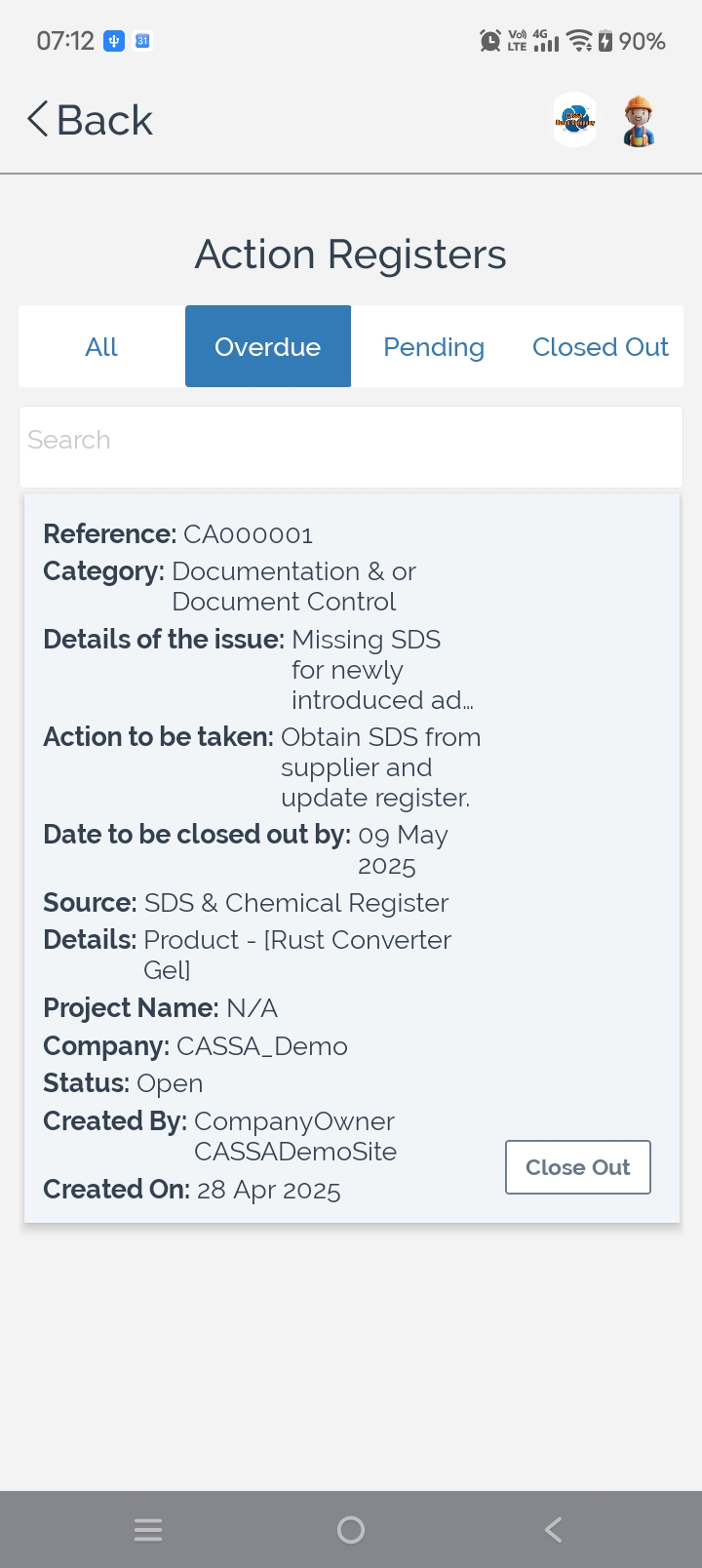
To review your assigned actions:
Select the appropriate status tab to display the actions you want to review:
All – Displays every assigned action.
Overdue – Displays actions that have passed their required completion date.
Pending – Displays actions that are still awaiting completion.
Closed Out – Displays actions that have already been completed.
Search for an action using the search field to quickly locate a specific record.
Review the action details displayed for each record, including:
Reference number
Category
Issue description
Required action
Close-out date
Source register
Related project
Company Status
Created by
Creation date
This information helps you understand what work is required and where the action originated.
To close an action:
Review the action to confirm the required work has been completed.
Select Close Out to mark the action as completed.
Note: Only close an action once all required work has been completed and any supporting records have been updated.
You can also:
Switch between status tabs to monitor outstanding and completed actions.
Review overdue actions to help prioritise work.
Search for specific actions when managing a large number of records.