

The Company Dashboard gives you quick access to employee information and invitation management. From this page, you can review recently registered employees, open employee profiles, resend invitations, or cancel invitations that are still pending.
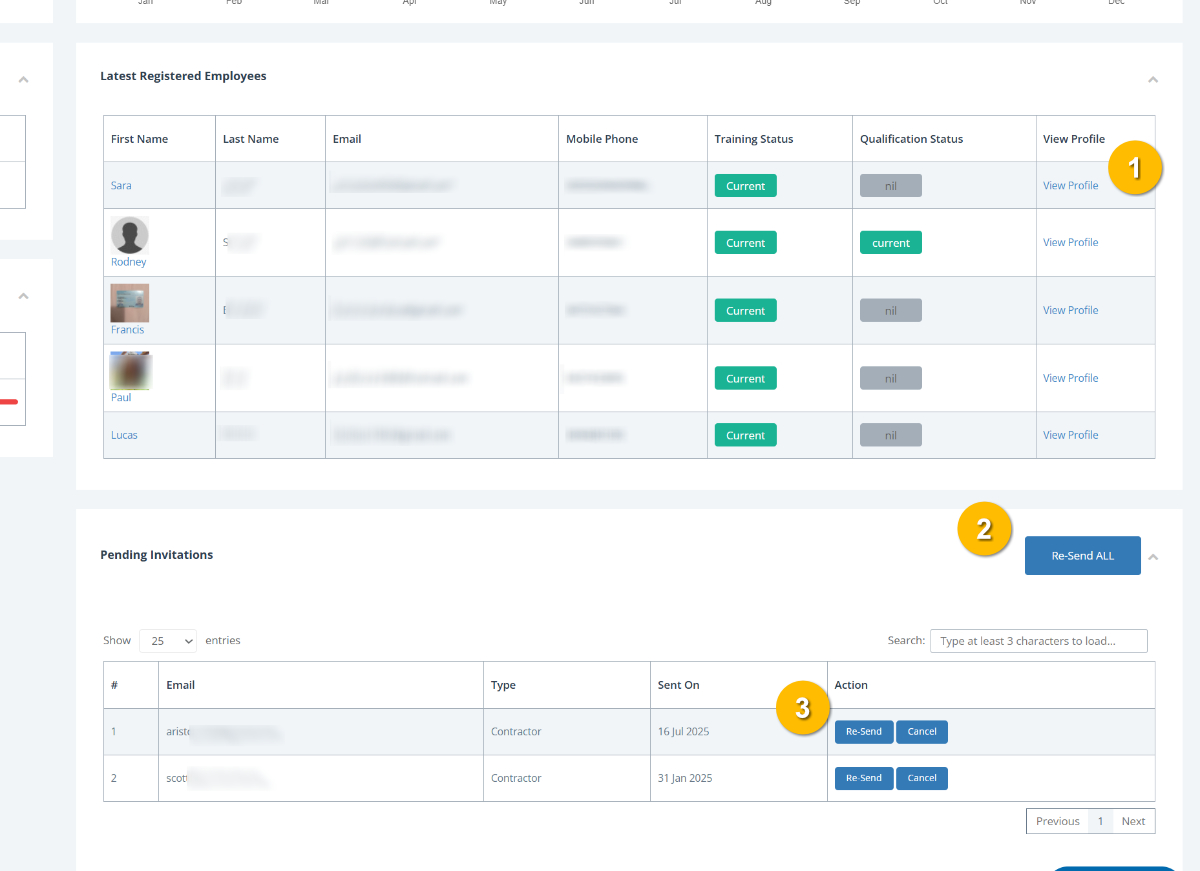
To manage employee and invitation actions from the dashboard:
View an employee profile by selecting View Profile (1) next to an employee in the Latest Registered Employees table. This opens their profile so you can review details, training status, qualifications, and other company records.
Re-send all pending invitations by selecting Re-Send ALL (2). This sends invitation emails again to everyone currently listed in the Pending Invitations section.
Note: Re-sending invitations can help if a worker or contractor has not received or missed their original invitation email.
Manage individual invitations by using the actions beside each pending invitation (3):
Select Re-Send to send the invitation again to that individual.
Select Cancel to remove the pending invitation if it is no longer required.
You can also:
Review employee Training Status and Qualification Status from the Latest Registered Employees table.
Search for specific pending invitations using the search field where needed.