


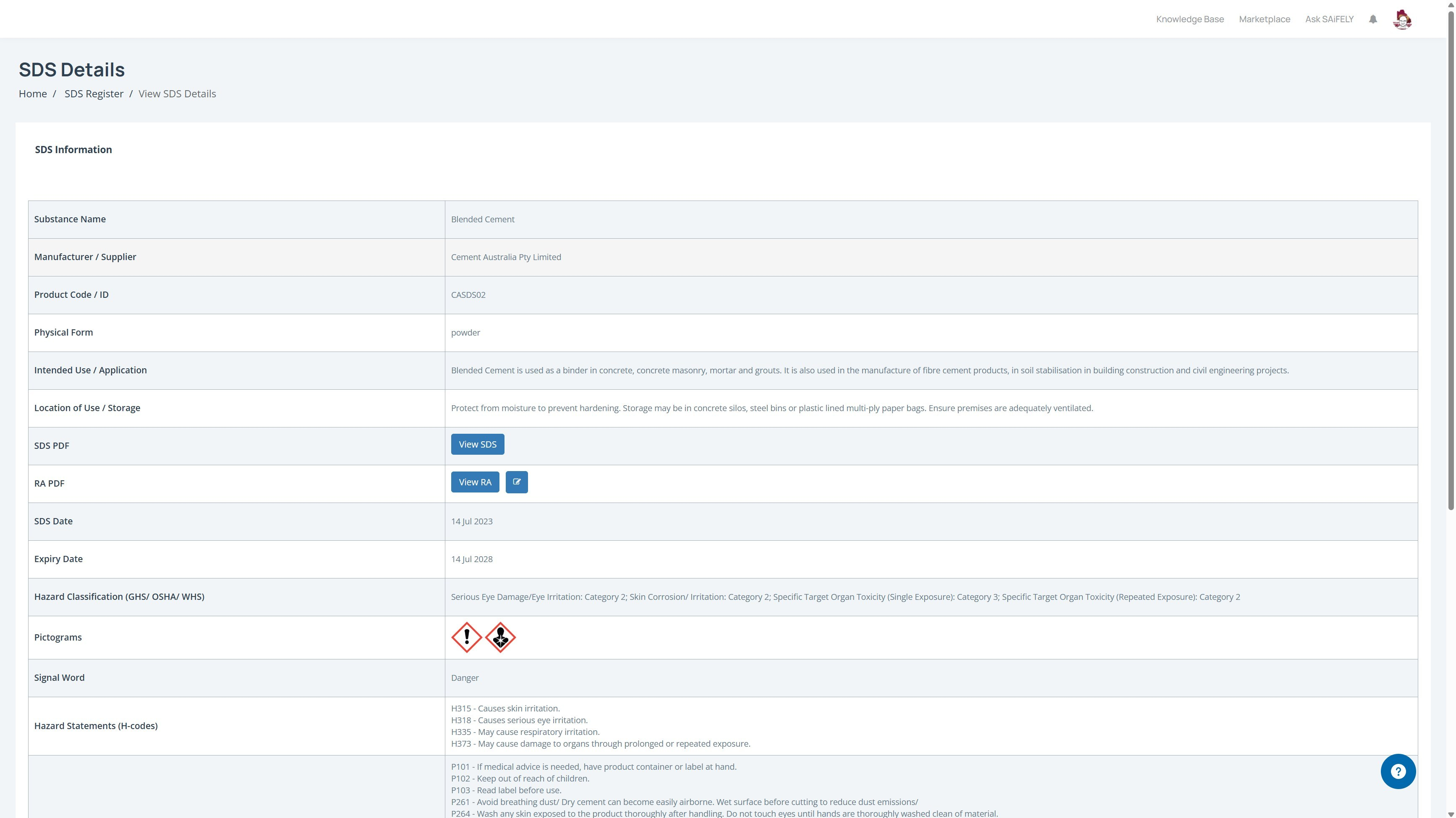
Open the SDS Details
From the Company Workspace, expand Asset Management in the main menu.
Select SDS Register.
Find the SDS you want to view.
Open the SDS record to display its details.
In the SDS Information section, click View SDS.
The original SDS PDF opens for you to view.
What is shown in the SDS Details
Before opening the PDF, the SDS Details page provides the information extracted from the SDS, including:
Substance Name
Manufacturer / Supplier
Product Code / ID
Physical Form
Intended Use / Application
Location of Use / Storage
SDS Date
Expiry Date
Hazard Classification (GHS / OSHA / WHS)
Pictograms
Signal Word
Hazard Statements (H-codes)
Precautionary Statements (P-codes)
The page also provides access to the original SDS PDF.
View the Original SDS
Click View SDS to open the uploaded PDF.
You can then review the complete Safety Data Sheet, including any information that is not displayed on the SDS Details page.