

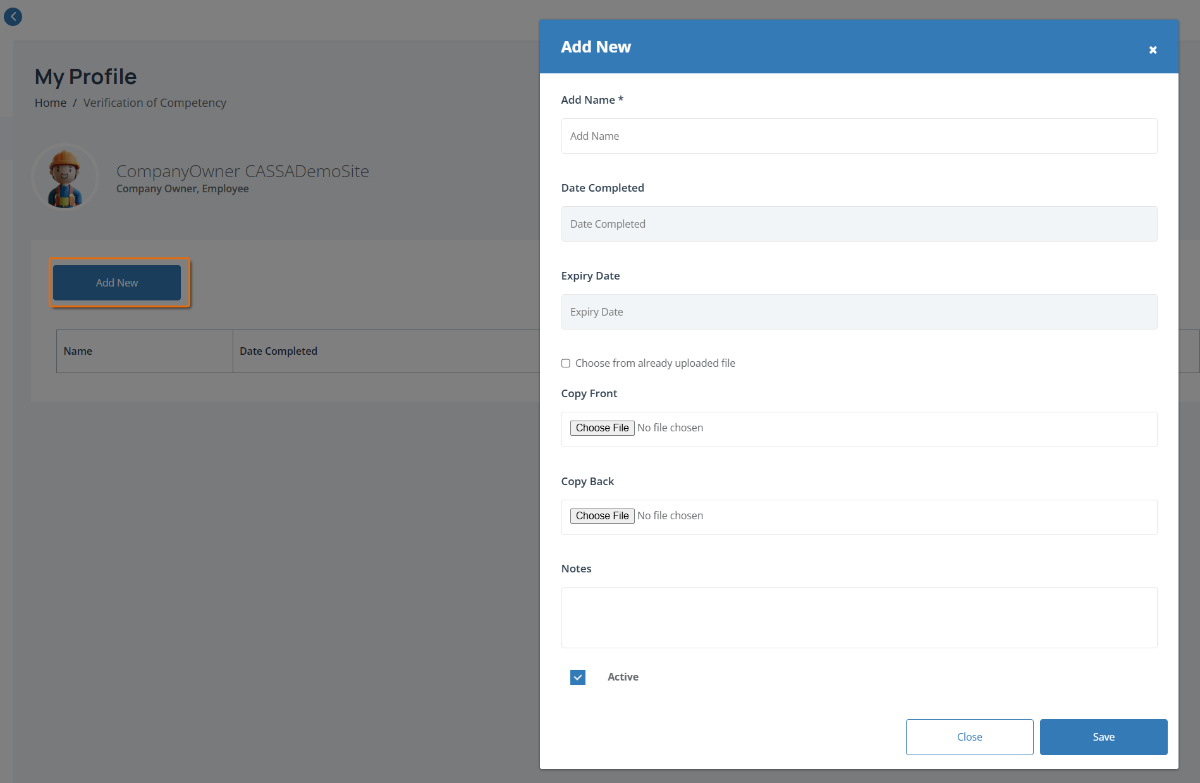
The Add New window is where you can add a new Verification of Competency (VoC) or Proficiency Assessment record to your profile, including supporting documents and expiry dates.
To complete this page:
Click on the Add New button and the the assessment details window will open.
Complete the required fields, including:
Add Name – Enter the name of the competency or assessment
Date Completed – Select when the assessment was completed
Expiry Date – Enter the assessment expiry date (if applicable)
Note: Fields marked with an * are required.
Upload supporting documents by clicking Choose File to add:
Copy Front – The front of the assessment document, licence or certificate
Copy Back – The back of the document (if required)
Reuse an uploaded file by ticking Choose from already uploaded file if the document has already been added to CASSA.
Add any notes in the Notes field if you want to include additional information.
Set the assessment status by leaving Active ticked if the competency is current.
Save the assessment by clicking Save to add it to your profile.