


The My Activities page (1) shows the status of forms and activities you have completed or submitted. You can use this page to monitor progress, review approvals, and check whether items are still pending, overdue, approved, or rejected.
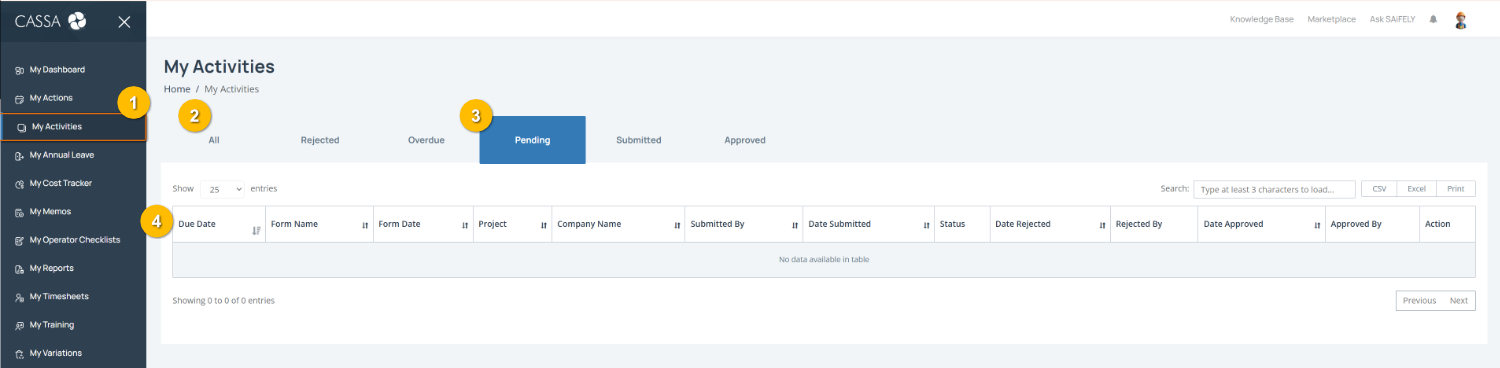
Open My Activities by selecting My Activities (1) from the left-hand menu.
Filter activities by status using the tabs (2) to view different activity stages, including All, Rejected, Overdue, Pending, Submitted, and Approved. The Pending tab (3) is selected by default.
Note: The activities shown will depend on your role, permissions, and any forms or processes you have submitted in CASSA.
Review activity details in the activity list (4), including information such as Due Date, Form Name, Project, Status, submission dates, approval details, and available actions.
You can also:
Search for a specific activity using the search field
Export activity records using CSV, Excel, or Print options where required.