


The My Cost Tracker page (1) is where you can view, filter, and submit project-related costs. This includes tracking submitted expenses, reviewing approval outcomes, and monitoring the status of cost items linked to specific projects.
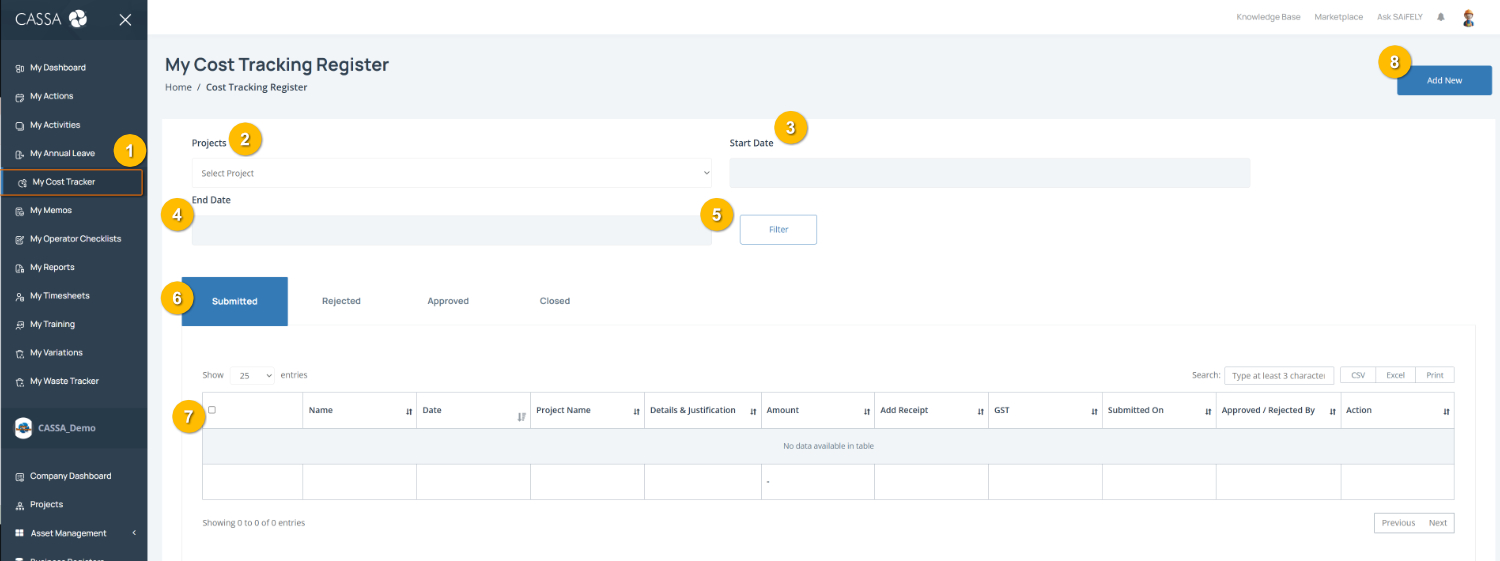
Open My Cost Tracker by selecting My Cost Tracker (1) from the left-hand menu.
Filter cost records by selecting a Project (2), entering a Start Date (3) and End Date (4), then selecting Filter (5) to refine the results.
View costs by status using the tabs (6) to filter between Submitted, Rejected, Approved, and Closed cost items.
Note: The Submitted tab is selected by default and displays cost items currently under review.
Review submitted costs in the register table (7), including details such as Project Name, Amount, GST, receipts, submission dates, approval outcomes, and available actions.
Add a new cost item by selecting Add New (8).
You can also:
Search for a specific cost entry using the search field
Export cost records using CSV, Excel, or Print options where required.