


The My Training page (1) allows you to access assigned training courses, monitor due dates, and review completed training history. Courses are grouped by status to help you manage overdue, scheduled, and completed training requirements.
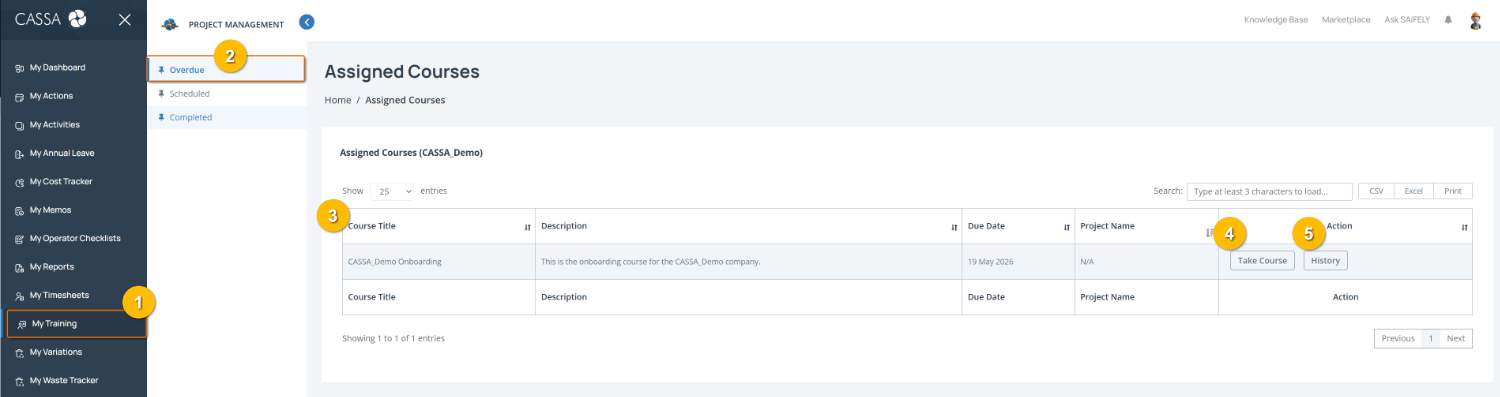
Open My Training by selecting My Training (1) from the left-hand menu.
View training by status using the training categories (2) to switch between Overdue, Scheduled, and Completed courses. The selected category will display the relevant assigned training records.
Review assigned course details in the training register (3), including the Course Title, description, due date, and linked project where applicable.
Start a training course by selecting Take Course (4) to open and complete the assigned training.
View course history by selecting History (5) to review previous activity or completion details for the selected course.
Note: Training availability and assigned courses will depend on your role, project requirements, and company settings.