


The My Operator Checklist page (1) allows you to review completed operator checklists, filter records, and create new checklist entries for vehicles and equipment. This page helps track inspections, plant usage, and operator activity across projects.
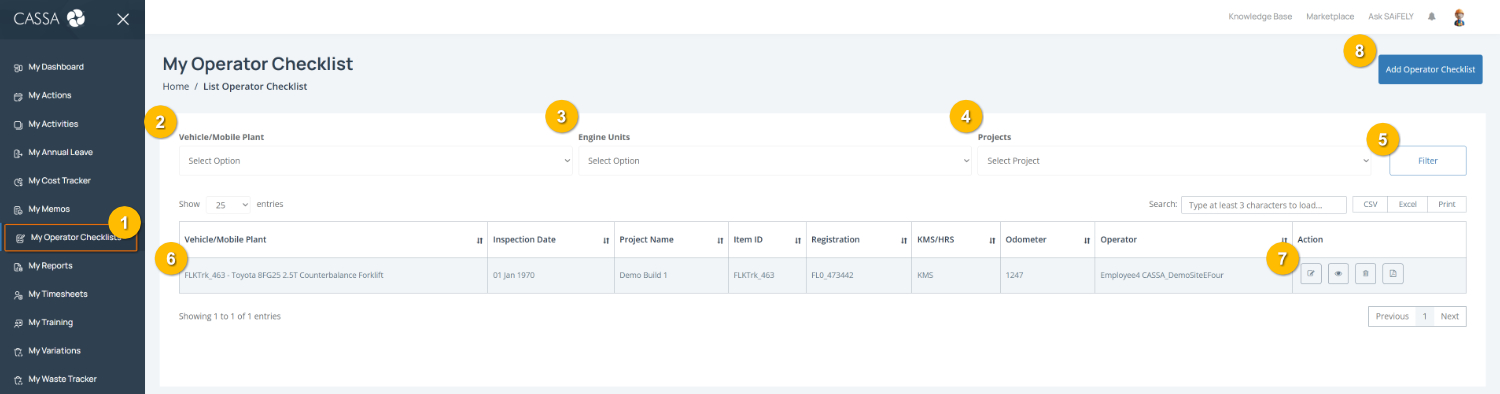
Open My Operator Checklist by selecting My Operator Checklists (1) from the left-hand menu.
Filter checklist records by selecting a Vehicle/Mobile Plant (2), Engine Units (3), and Project (4), then selecting Filter (5) to update the results.
Note: Filters can help narrow down checklist records for a specific vehicle, engine unit, or project.
Review checklist details in the register table (6), including the inspection date, project name, registration details, odometer reading, and assigned operator.
Manage checklist records using the available actions (7):
Edit to update an existing checklist
View to open checklist details
Delete to remove a checklist record
PDF to download or print a copy of the checklist
Add a new operator checklist by selecting Add Operator Checklist (8).
You can also:
Search for a specific checklist using the search field
Export checklist records using CSV, Excel, or Print options where required.