

The View Item Detail page opens when you select View Item from My Actions. This page allows you to review the full register item, access attachments, view related corrective actions and submit forms or additional actions if required.
To complete this page:
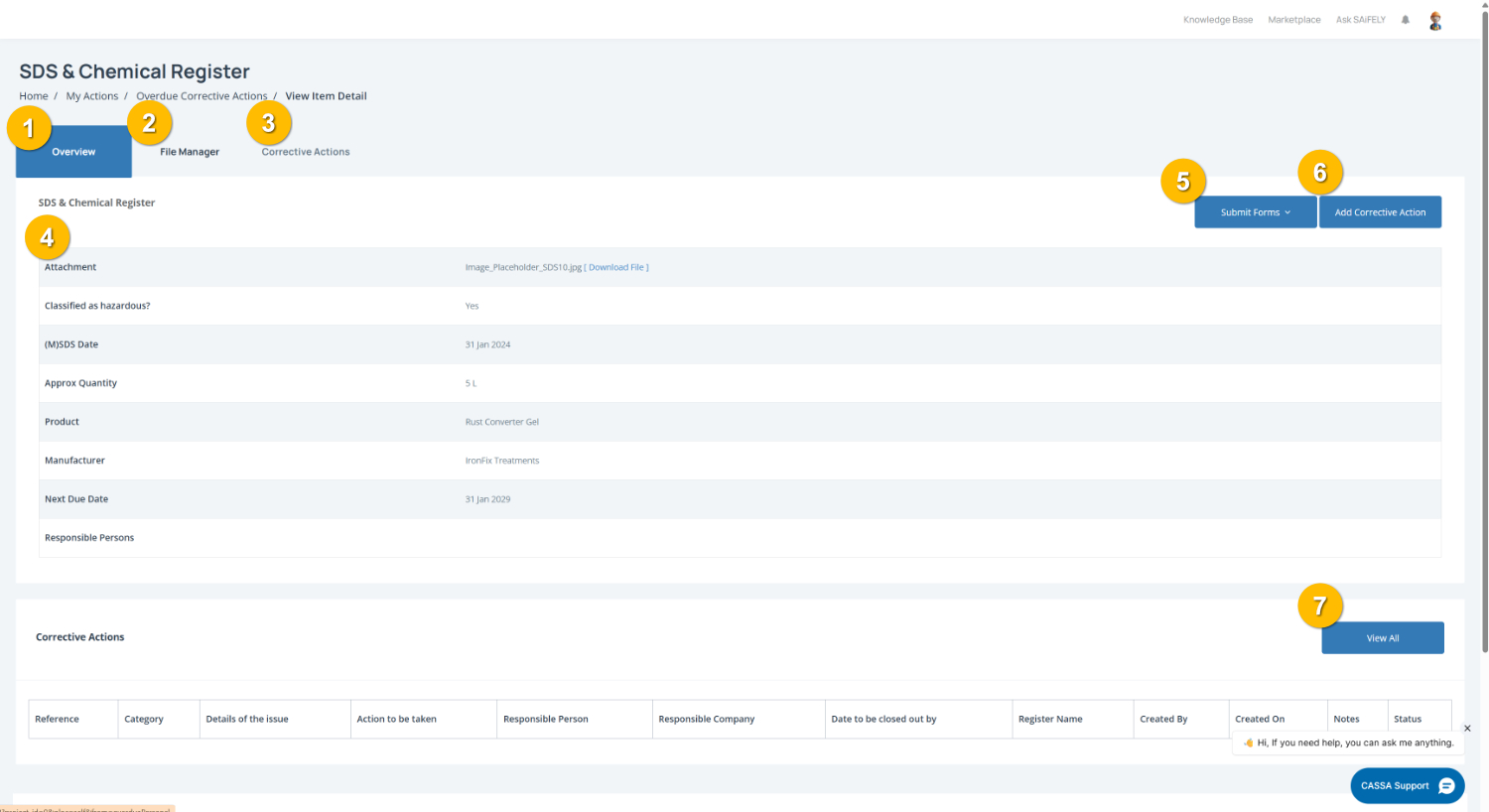
Review the register overview by selecting the Overview tab (1). This displays the full details of the register item, including attachments, dates, product information and other relevant record details.
Access supporting documents by opening the File Manager tab (2) to view or download files linked to the item.
Review corrective actions by selecting the Corrective Actions tab (3) to view any actions raised against this register item.
Check item details by reviewing the information panel (4). Depending on the register, this may include attachments, responsible persons, dates, classifications or product information.
Submit required forms by clicking Submit Forms (5) if a form or response is required as part of the corrective action process.
Add a corrective action by clicking Add Corrective Action (6) to raise a new action linked to this item.
View all corrective actions by clicking View All (7) to display the full corrective action register for this item.
Note: The information shown will vary depending on the register item you are viewing (for example SDS Registers, Plant Registers or other compliance records).