

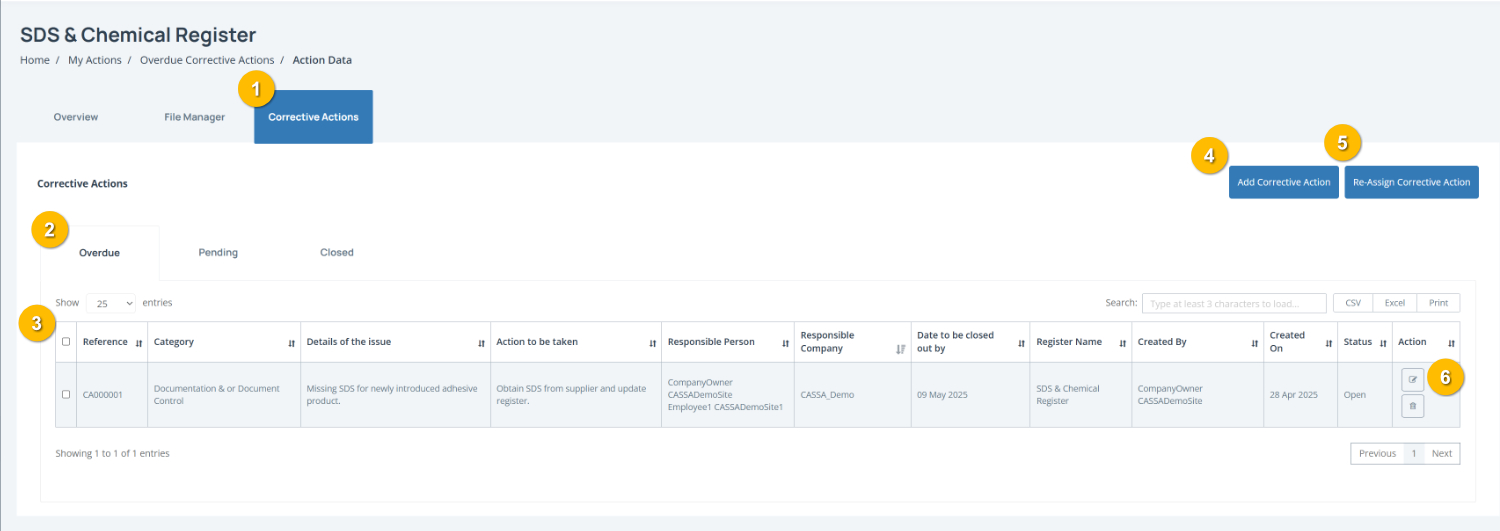
The Corrective Actions tab (1) displays actions raised against the selected register item. You can review outstanding actions, monitor progress, assign responsibilities and update corrective action records from this page.
To complete this page:
Filter corrective actions by status using the tabs (2) to switch between:
Overdue – actions past their required close out date
Pending – actions currently in progress
Closed – completed actions
Review corrective action details by checking the corrective action register table (3). Records include the Category, Issue Details, Action to be Taken, Responsible Person, Close Out Date, Status, and related register information.
Add a corrective action by clicking Add Corrective Action (4) to create a new action linked to the register item.
Reassign an action by clicking Re-Assign Corrective Action (5) to allocate responsibility to another person or company where required.
Manage corrective action records using the Action buttons (6) to view, edit or update corrective action details.
Note: Corrective actions should be completed and closed out before the required due date to maintain compliance and reduce outstanding risks.