

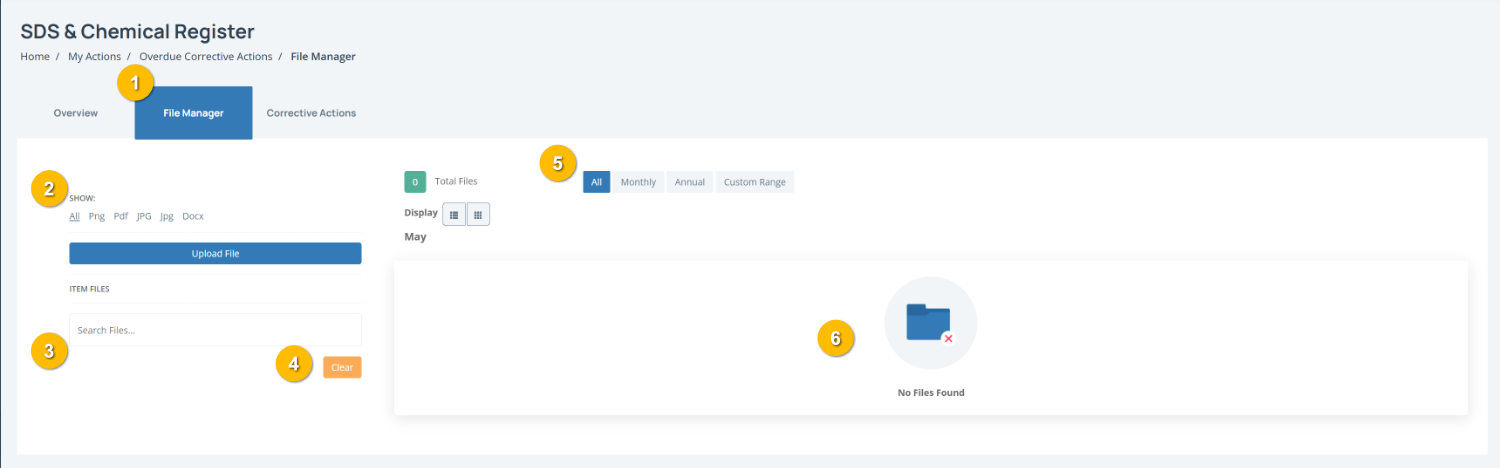
The File Manager tab (1) allows you to view and manage documents attached to a register item. You can upload supporting files, search existing documents and filter files by type or date range.
To complete this page:
Filter files by type by using the file type options (2) to display specific file formats such as PNG, PDF, JPG, JPEG, or DOCX.
Upload supporting documents by clicking Upload File to attach files relevant to the register item, such as supporting evidence, certificates or documentation.
Search for files by entering keywords into the Search Files (3) field to quickly locate attached documents.
Reset your search by clicking Clear (4) to remove search filters and display all available files.
Filter files by date using the options (5) to display:
All files
Monthly uploads
Annual uploads
A Custom Range
Review uploaded files in the file display area (6). Attached documents will appear here and can be opened or downloaded where available.
Note: If No Files Found appears, no documents have been uploaded to this register item yet.