

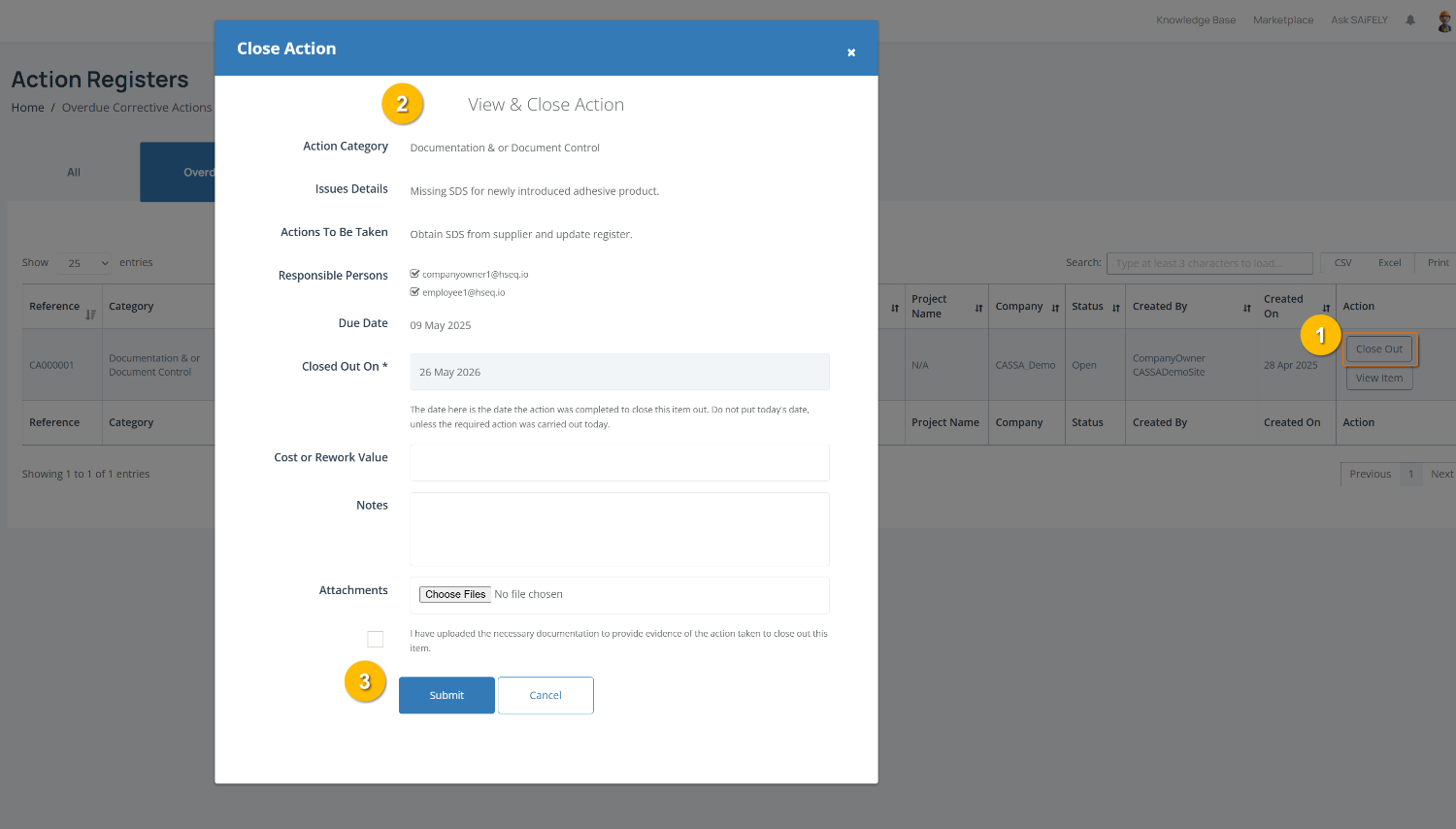
The Close Action window opens when you select Close Out (1) from My Actions. This page allows you to review the corrective action, provide close out details and upload supporting evidence before marking the action as complete.
To complete this page:
Review action details by checking the information panel (2). This includes the Action Category, Issue Details, Required Action, Responsible Persons, and Due Date.
Enter the close out date by confirming the Closed Out On field. This should reflect the date the action was completed.
Note: Do not enter today’s date unless the required action was completed today.
Record action details by entering the Cost or Rework Value and adding any relevant Notes about the completed action.
Upload supporting evidence by clicking Choose Files to attach documents, photos or other records showing the action has been completed.
Confirm completion by ticking the confirmation checkbox to verify that all required documentation has been uploaded.
Submit the close out by clicking Submit (3) to finalise the action, or Cancel to exit without saving.
Note: Once an action is closed out, it may no longer appear in your outstanding action list and will move to completed records.