

The Login As Privacy Settings allow you to control whether a listed company can view your personal profile when accessing your account through the Login As feature. You can enable or disable access for each company shown in the list.
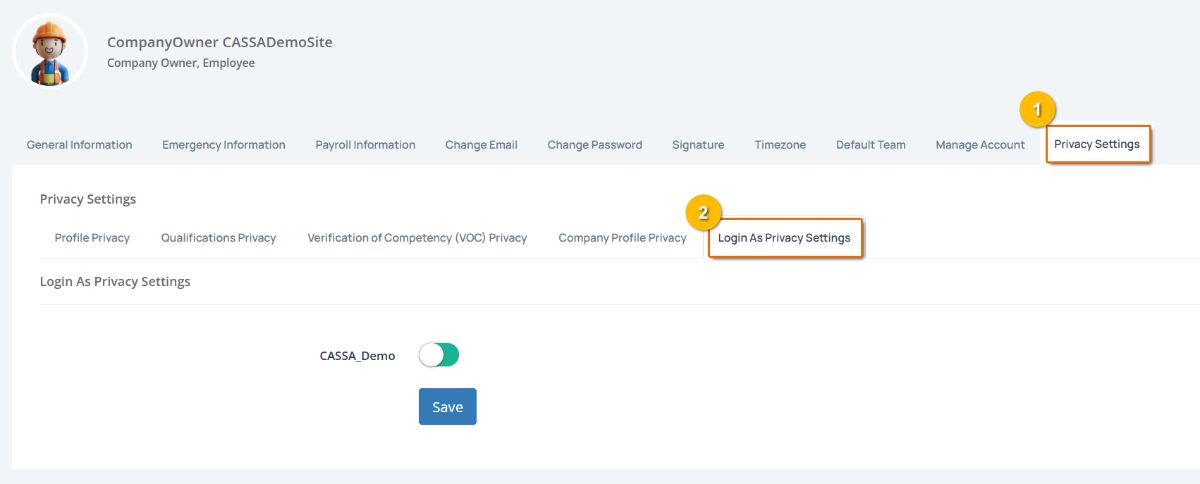
To manage Login As privacy:
Open Login As privacy settings by selecting Privacy Settings from your profile settings, then selecting Login As Privacy Settings.
Review the companies listed in the settings. Each company has its own access toggle.
Allow or prevent profile access by switching the toggle beside the relevant company:
Enabled – Allows the company to view your profile when using Login As.
Disabled – Prevents the company from viewing your profile through Login As.
Save your privacy settings by selecting Save.
Note: These settings control access to your profile through Login As. They do not remove your association with the company or affect your normal access to CASSA.